Today touchscreens have become an integral part of digital life; from smartphones and tablets to laptops, ATMs and point-of-sale systems. However, contrary to common belief, touchscreen technology has a much longer history and its earliest examples date back to the 1960s.
But the main question is exactly when and by whom was the world’s first touch computer built?
The answer to this question largely depends on our definition of a “touch computer.” The earliest examples of touch technology were developed in 1965 by E. A. Johnson. He designed a touch system for use in air traffic control systems.
Despite being pioneering, this technology was not a personal computer in the modern sense and its use was limited to specialized air traffic control environments.
From scientific systems to educating students
After the development of the first touch technologies, other examples were also used in specialized environments.
These include touch control systems developed at CERN for scientific equipment and also PLATO IV. PLATO IV, introduced in 1972, was an educational terminal equipped with a touchscreen designed to assist in student education.
However, these systems were still considered specialized devices and were not available to the general public.
HP 150; one of the first commercial personal computers with a touchscreen
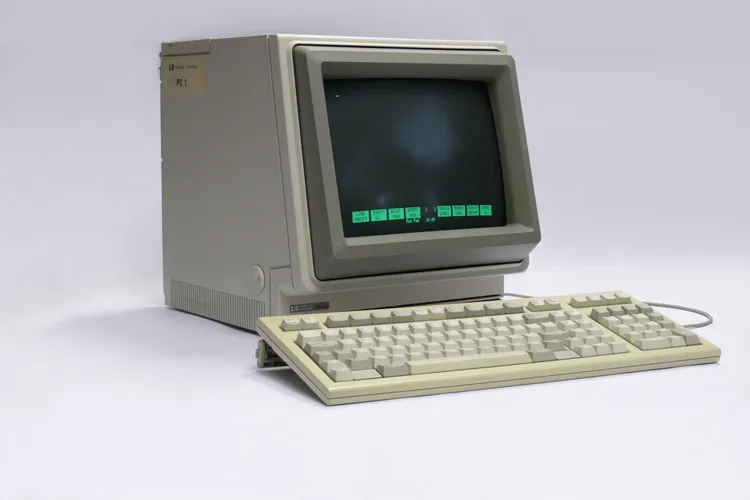
If by the first touch computer we mean a personal and commercial product, one should refer to the HP 150; a product that HP released in 1983.
The HP 150 was one of the first commercial computers to use touchscreen technology for direct interaction with the user.
The system consisted of two main parts: a dual floppy-disk drive for installing and running the operating system and a display that housed most of the main computer hardware.
The HP 150 was equipped with a set of communication ports, many of which are no longer widely used today. The device featured two RS-232 ports, one IEEE-488 or GPIB port for connecting equipment and external drives, AC input and output, and an RJ-11 port for connecting a keyboard.
Like many contemporaneous devices, this computer did not support a mouse and user interaction was mainly through the keyboard and the touchscreen. Users could also add other capabilities, such as connecting peripherals, to the system via expansion cards.
How did the HP 150 touchscreen work?
Today, capacitive and resistive technologies are among the most common types of touchscreens. Capacitive touchscreens, used in smartphones, tablets and many modern laptops, detect touch location by sensing electrical changes caused by a finger contact.
In contrast, resistive displays consist of layers that register the touch point when pressure causes them to contact each other. This technology is still used in some ATMs and point-of-sale terminals.
But the HP 150 did not use either of these two methods. The technology used in this device was an infrared or IR-based touch system. Around the display, a set of infrared transmitters and receivers was placed that created an invisible grid of horizontal and vertical beams in front of the screen.
When a user’s hand or any other object moved towards the screen, this light grid was disrupted and the system could determine the touch location.
This method was considered significant technology at the time, but it also had important limitations.
Why was the HP 150’s touch technology abandoned?
The HP 150’s infrared system could only detect one touch point at a time. Therefore, features like multitouch and gestures such as two-finger zoom were not available.
In addition, placing the infrared transmitters and receivers required larger bezels around the display. Dust could also block the openings for these sensors and disrupt touchscreen performance.
These limitations led the technology industry to gradually move toward other methods, including capacitive and resistive technologies.
Does HP still make touch computers?
After the release of the HP 150, the company did not release a product with a finger-direct touchscreen for more than two decades.
In 2002, the HP Compaq TC1000 was introduced and was later followed by the TC1100. However, these devices were more dependent on a digitizer pen and did not support direct finger touch as in the modern sense.
HP’s serious return to the touch computer market came with the HP TouchSmart series in 2007. These products were all-in-one desktop computers that used infrared touch technology.
A year later, in 2008, HP introduced the TouchSmart tx2; a product that shifted the company toward capacitive technology and added support for multitouch.
Since then, HP has released various models of laptops and touch devices.
Today the company offers a wide range of touch products for different users. Series such as HP OmniBook, OmniBook Ultra and OmniBook X provide foldable and convertible models for general consumers.
In contrast, the HP ProBook, EliteBook and ZBook families are designed more for business users, executives and professionals. HP has also continued producing touch-enabled Chromebooks as cost-effective options.
The multi-decade path of touch technology evolution shows that the technology that today seems completely ordinary in phones and laptops is the result of decades of experimentation and development; a path that began with air traffic control systems and became one of the main ways humans interact with digital devices.