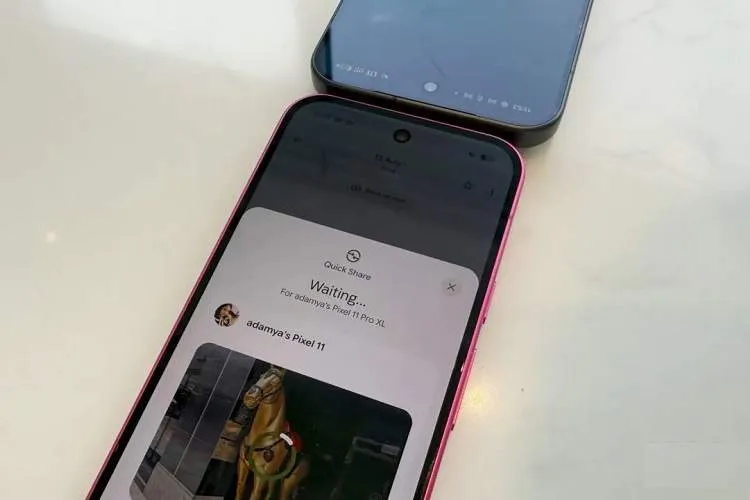
Google, with the introduction of the new Tap to Share feature on the Pixel 11 series phones, has made file and information transfer with Quick Share simpler and more natural.
According to itna citing AndroidAuthority, this feature allows users to establish a Quick Share connection simply by bringing the top parts of two compatible Android phones close to each other; a method that bears much resemblance to similar features in Apple's ecosystem.
To use Tap to Share, both phones only need to be unlocked and their screens facing up. By bringing the top portions of the two devices together, the screen edges light up and a short sound confirms that the phones have recognized each other. The user can then select the content to share.
If no specific content has been selected before starting, Tap to Share by default offers the ability to share contact information. Users can send phone numbers, contact details, email, and on phones with two active numbers, one or both numbers. This feature can also be used to send photos, videos, files, and web links.
Tap to Share works via NFC and differs from the regular Quick Share feature. It is designed to establish a direct connection between two phones and currently does not work between Pixel and iPhone. To send a file to an iPhone you must still use the usual Quick Share method.
This feature is currently available for Pixel 6 and newer models running Android 17 or later. Google plans to add Tap to Share to more phones including the Galaxy Z Fold 8, Galaxy Z Fold 8 Ultra, and Galaxy Z Flip 8.
To transfer a photo, video, or file, simply open the content you want, tap Share, and bring the unlocked top parts of the two phones close together. To disable the feature you can go to Settings, user profile, All services, Quick Share, and then Tap to Share.
If the feature does not work, check that NFC is enabled on both phones, that the top parts of the devices are close together, and remove thick cases. Google has moved the NFC antenna to the top of the phone on the Pixel 11 series to make using this feature more natural and faster.