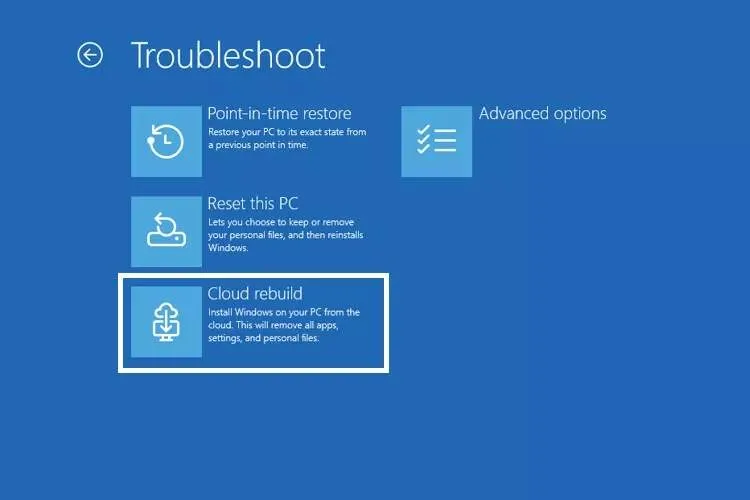
Microsoft has introduced an important feature called Cloud Rebuild in the new Windows 11 preview that enables reinstallation of the operating system via the cloud.
According to Eitena quoting Techspot, this feature is offered in Windows Insider Beta Preview Build 26220.9343 and users no longer necessarily need a USB drive, installation disc, or custom Windows image to use it.
Cloud Rebuild is available through the Windows recovery environment; an environment that typically appears after several unsuccessful attempts to start Windows. Users can also access this environment via Settings > System > Recovery > Restart now. After selecting the Troubleshoot option and then Reset this PC, the Cloud Rebuild option appears.
To use this method, the device must be connected to the internet via Wi‑Fi or an Ethernet cable. The user can review the desired Windows edition, build, and language before the download begins. Then the system downloads and installs a fresh copy of Windows from the cloud.
One of the main advantages of this feature is that Cloud Rebuild can be used even if the installed operating system is corrupted, because the recovery process relies on a healthy, fresh copy of Windows. The feature also automatically restores required drivers so the device retains basic functionality after reinstallation.
Microsoft has also made an important change for Wi‑Fi users. In the new build, it is possible to save Wi‑Fi profiles in the recovery environment so users do not have to re-enter wireless connection information after entering that environment. Of course, the recovery environment still requires a network driver to use Cloud Rebuild.
Currently, using this feature requires physical access to the device or running a command prompt with local administrator privileges, but support for remote deployment via solutions like Microsoft Intune will be provided in the future.
This update, in addition to Cloud Rebuild, includes changes to AutoPlay, desktop personalization, File Explorer, Magnifier, and emojis, and adds automatic backup of phone photos and videos to OneDrive.